Sandbox
The interactive playground for every Chativa feature. Hosted at chativa.aimtune.dev/sandbox.
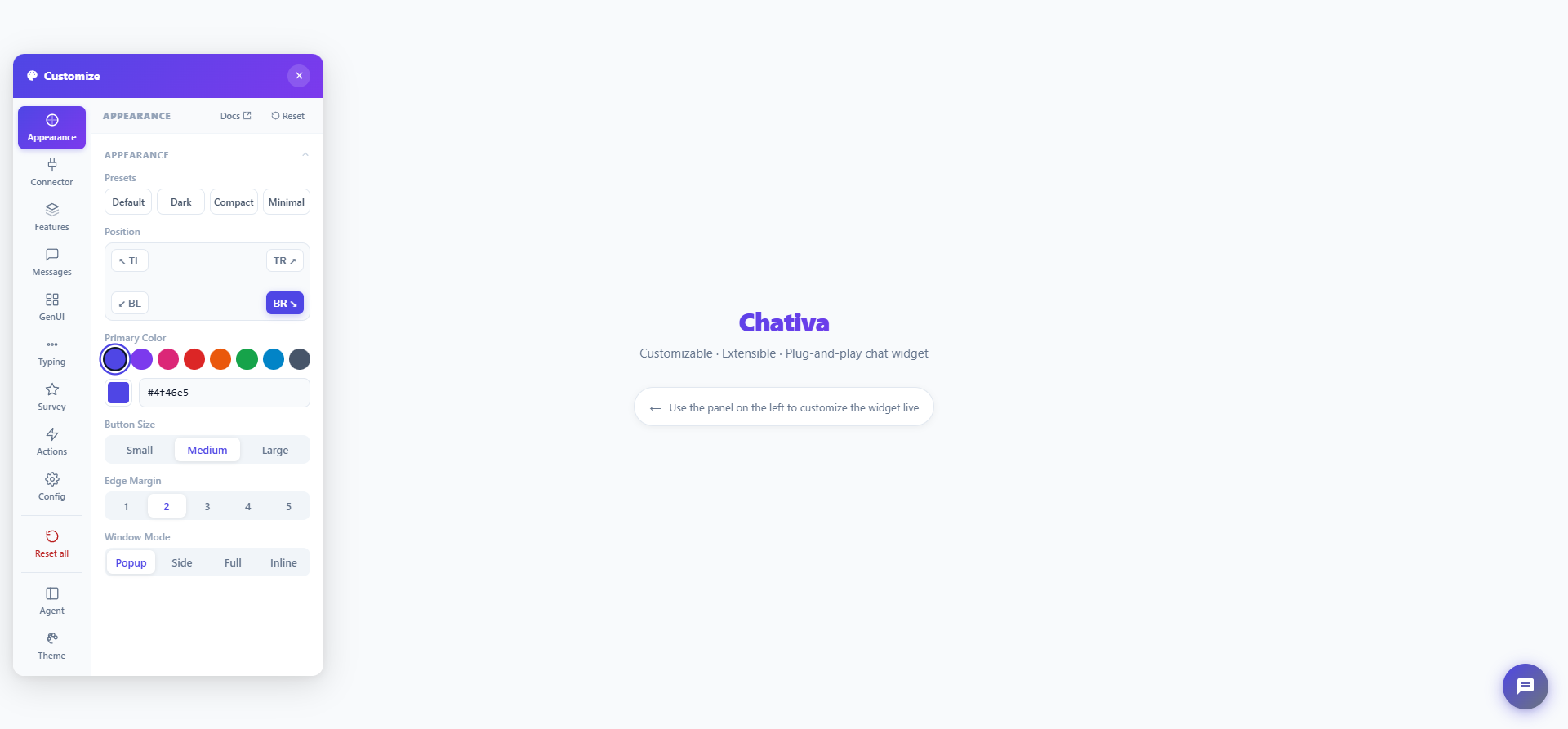
Screenshot pending capture.
What's inside
The sandbox is a single Vite app at apps/sandbox/. The customisation panel docks to the left of the viewport with a vertical tab rail; each tab is a self-contained section component. The whole layout collapses to a bottom-anchored panel with a horizontal tab strip on viewports under 768 px.
| Tab | What it controls | Source |
|---|---|---|
| Appearance | Theme presets, colors, position, size, layout, window mode | apps/sandbox/src/sandbox/sections/AppearanceSection.ts |
| Connector | Active connector + status, kind picker (Dummy, DirectLine, mekik, mekik behind Converger, Converger hub), per-kind options, capability matrix | ConnectorSection.ts |
| Rules | Add / edit / reorder / remove DummyConnector scripted rules; Apply rebuilds the dummy | RulesSection.ts |
| Features | enableSearch, enableFileUpload, enableMultiConversation, showMessageStatus, allowFullscreen, hideButtonOnOpen, message actions (theme switches + simulated server permissions), language | FeaturesSection.ts |
| Messages | Inject demo messages of every built-in type | MessagesSection.ts |
| GenUI | Trigger every demo stream (form, card, table, chart, …) | GenUISection.ts |
| Typing | On/off + duration vs. until-message | TypingSection.ts |
| Survey | Toggle, mode, trigger, rating, kind, resetOnSubmit | SurveySection.ts |
| Actions | connect, disconnect, clear, loadMore, fire EventBus events | ActionsSection.ts |
| Config | Generated ChativaSettings JSON / HTML snippet / paste-to-apply | ConfigSection.ts |
| Preview | Live preview area — render the widget at Mobile / Tablet / Desktop / Free sizes (hidden under 768 px) | PreviewSection.ts, PreviewStage.ts |
Each tab has a sticky toolbar with a Docs ↗ link to the matching docs/ page and, where relevant, a Reset button that wipes that tab's fields back to baseline. The tab rail also has a global Reset all entry that mirrors the Default preset and clears the message store.
There are also two extra entry points:
theme-editor.html— visual color/layout editor that exports JSON orThemeBuildercode.agent-panel.html— multi-conversation demo againstDummyConnector.
Converger
Two Connector-tab presets talk to a Converger hub:
| Preset | Connector | What it shows |
|---|---|---|
| mekik behind Converger | MekikConnector, unchanged (mekik → Behind Converger) | The mekik/1 profile: text, chips, rich messages, tool calls, GenUI, resume. |
| Converger hub | ConvergerConnector (Converger) | The same plus acks, delivered / read ticks, uploads, history paging and reactions. |
Both have a Credential selector:
| Credential | Token from | Notes |
|---|---|---|
| Dev server (default) | TokenAuth with the sandbox dev server's token endpoint, POST /api/converger-token (convergerTokenPlugin in apps/sandbox/vite.config.ts) | The endpoint holds the channel secret and calls Converger's POST /api/v1/converger/tokens/generate, so the secret never reaches the browser — the same split your own backend should make. Only under pnpm dev. Sets resumeConversation: true. |
| Token | A token you paste, e.g. from the Converger channel page's Test token action (AimTune/converger#194) | Used as a static TokenAuth: once it expires, paste a new one and connect again. |
| Publishable key | PublishableKeyAuth with a pasted cvg_pk_... key | Exchanged in the browser; the conversation is kept in localStorage per key, so a reload continues it. The sandbox origin must be in the key's allowed origins, which also cover CORS (no CORS_ORIGINS change needed). Needs a Converger with publishable keys (AimTune/converger#195). |
All set routeInUrl: true. With Dev server or Token, leave Conversation empty to let the server start one; a publishable key's token is bound to its own conversation.
# Converger (its repo): allow the sandbox origin (Dev server and Token modes)
CORS_ORIGINS=http://localhost:5173 mix phx.server

# Chativa: the secret of a websocket channel of that Converger
CONVERGER_URL=http://localhost:4000 CONVERGER_CHANNEL_SECRET=... pnpm dev
agent-panel.html?converger=http://localhost:4000 runs the agent panel on ConvergerConnector with a channel-scoped token (scope: "channel"): the channel's conversations, switching, new and close. The token endpoint exists only under pnpm dev; on the static build (GitHub Pages) use Token or Publishable key.
Theme presets
The Appearance tab exposes four one-click presets:
- Default — full reset to documented baseline.
- Dark — dark-palette colors.
- Compact — small launcher + 320 × 440 panel.
- Minimal — disables search, file upload, fullscreen toggle, and the survey flow.
Presets are cumulative — Dark + Compact gives you a small dark widget. Click Default to wipe.
Dummy rules
The Rules tab is an editor for DummyConnector scripted rules. Each rule card has:
- Text regex →
when.textMatches(empty = any text). Invalid patterns are flagged inline. - Msg type →
when.type(empty = any type). - Respond → a static message (
IncomingMessageJSON) or GenUI chunks (AIChunk[]JSON, wrapped as{ kind: "genui", chunks }). - Delay (ms) →
delay(empty = the connector'sreplyDelay).
Use + Add rule for a blank rule, Load example for the help-menu / cancel-flow pair from the connector docs, the arrows to reorder (first match wins) and ✕ to remove. Apply validates every rule, then rebuilds the DummyConnector through the same swap path as the Connector tab's Connect button (keeping the reply / connect delays set there) and re-points the Messages / GenUI demo buttons at the new instance. If another connector is active, Apply switches back to Dummy.
Message actions
The sandbox registers three example custom message actions at startup (apps/sandbox/src/sandbox/messageActions.ts). They use the default placement: "menu", so they sit in the "⋮" menu at the end of the row, after the built-in copy, regenerate and edit buttons. Their labels come with translations for Turkish, German, French and Spanish; switch the widget language to see them change.
| Action | Icon | Shown on | What it does |
|---|---|---|---|
| Share | 📤 | Bot text messages (messageTypes: ["text"]) | Opens the Web Share sheet; without the Web Share API, copies the text instead. |
| Report | 🚩 | Bot messages except GenUI widgets (excludeMessageTypes: ["genui"]) | Marks the message as reported (data.reported), which hides the action again through isVisible. |
| Translate | 🌐 | Bot and user text / buttons / quick-reply messages (appliesTo: ["bot", "user"]) | Opens the text in Google Translate in a new tab. |
To try the code-block copy buttons, click 🧑💻 Code Block in the Messages tab: it injects a bot message with two fenced blocks, each with its own Copy code button. The 🔧 Tool Calls buttons on the same tab (or sending /tools) produce tool-call cards whose Parameters / Result / Error sections have copy buttons once expanded.
The dummy connector implements regenerate and edit, so those buttons show as well. Regenerating replays your last message; before you have typed anything, it replays the last user message of the loaded history.
The Features tab has a Message actions group to switch them off and on. Everything is on by default.
| Switch | What it sets |
|---|---|
| Copy, Code / tool-call copy, Regenerate, Edit | theme.messageActions.copy / codeBlockCopy / regenerate / edit |
| Fallback (emulate) | theme.messageActions.fallback (off by default; only matters for connectors without regenerate / edit) |
| Server allows regenerate / Server allows edit | Calls the dummy's setCapabilities(), simulating a backend that refuses the action. It persists when the dummy is rebuilt from another tab. |
Generated config
The Config tab shows a live ChativaSettings JSON diff (only the fields you've changed against DEFAULT_THEME), pinned with a $schema URL pointing at the schema hosted on this same GitHub Pages deployment. Copy as JSON, copy as drop-in HTML snippet, or download chativa.config.json.
The same tab has an Import view — paste a ChativaSettings blob, click Apply, and it validates the shape and routes the override into chatStore.setTheme() / setConnector().
When the active DummyConnector has rules, the JSON writes connector in an object form so the rule set travels with the rest of the config:
{
  "connector": {
    "name": "dummy",
    "dummy": {
      "rules": [
        { "when": { "textMatches": "^/help$" }, "then": { "id": "help", "type": "text", "data": { "text": "Try /genui" } } }
      ]
    }
  }
}
Pasting that shape into Import rebuilds the dummy with those rules (and fills the Rules tab). The object form is a sandbox convention — window.chativaSettings.connector only accepts a connector name or instance — so the HTML snippet collapses it back to "dummy" with a comment; in your own page pass the rules to new DummyConnector({ rules }) and register it.
Preview area
The Preview tab opens a live preview area to the right of the panel, so you can check responsive behavior without resizing the browser. Pick a viewport from the tab, or from the chip toolbar above the preview frame:
| Chip | Size |
|---|---|
| Mobile | 390 × 844 |
| Tablet | 768 × 1024 |
| Desktop | 1280 × 800 |
| Free | Drag the frame's bottom-right corner to any size (starts at 480 × 720) |
- The widget switches to
windowMode: "inline"and fills the frame, sotheme.layout.width/heightdo not apply while previewing — the frame size does. The previous window mode is restored when the preview closes. - When a preset is larger than the free space, the frame is scaled down with a CSS transform. The toolbar always shows the real size in CSS pixels, plus the zoom level when scaled (for example
1280 × 800 · 62%). - The selected viewport persists across tab switches. It is cleared by the Preview tab's Reset, the × in the preview toolbar, Reset all, or picking another window mode in the Appearance tab (which keeps that new mode).
- While the preview is open the floating launcher is hidden; if you close the widget from its header, the frame shows an Open widget button.
- The Config tab reflects
windowMode: "inline"while the preview is open, because the preview drives the real theme. - The tab and the preview area are hidden on viewports 768 px wide or narrower — there, the page itself is already the small case.
The preview is single-instance: it does not mount a second <chat-iva>. The page's one widget is wrapped in <sandbox-preview-stage>, which is a transparent wrapper (display: contents) until a viewport is picked and then slots the same widget into the sized frame. chatStore and messageStore are global singletons, so a second widget would share isOpened, the theme and the window mode with the first, and both would build a ChatEngine over the same registered connector (two connect() calls, one overwritten onMessage handler). Moving the widget to a new parent element is avoided too, because disconnectedCallback destroys its engine.
Running locally
pnpm install
pnpm dev          # serves http://localhost:5173
Hot reload is wired to every package in the workspace via Vite aliases (see apps/sandbox/vite.config.ts) — editing packages/core immediately re-renders the sandbox. The Vite plugin in that file also serves the workspace schemas/ folder under /schemas/* in dev and copies the tree into dist/schemas/ on build, so the schema $id URLs resolve when the sandbox is served from GitHub Pages.
Building for GitHub Pages
VITE_BASE=/chativa/ pnpm --filter sandbox build
CI publishes the result to gh-pages and the live site at the URL above.