What is Chativa?
Chativa is an open-source chat widget you can drop into any web page — React, Vue, Angular, or plain HTML — by adding a single <script> tag and two custom elements.
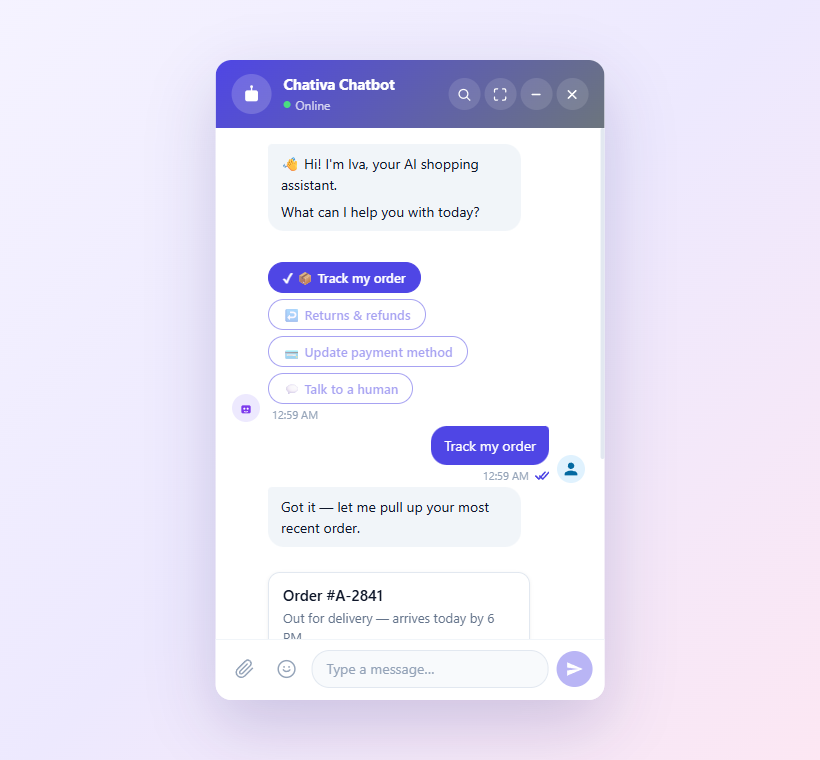
The widget in popup mode — bot greeting, quick-reply with the user's pick highlighted (
keepActions: true), and the bot follow-up.
Under the hood it's a small TypeScript monorepo built on Web Components (LitElement), wrapped around a clean Ports & Adapters core. The visual widget knows nothing about your backend; the backend ("connector") knows nothing about the UI; and a middleware layer ("extensions") lets you tap into the message pipeline without forking either side.
TL;DR — three paragraphs is the whole mental model:
- The widget is a Web Component (
<chat-iva>). It renders the UI.- A connector (
IConnector) talks to your backend — WebSocket, SignalR, DirectLine, SSE, plain HTTP, or your own.- Stores wire them together. Extensions are middleware between them. Generative UI streams interactive widgets inline. Theme is a JSON object you can swap at any time.
Everything else in these docs is a refinement of those three paragraphs.
Why does it exist?
Most chat widgets ship as a black-box <iframe> — fast to drop in, painful to customize, impossible to integrate with anything but their bundled cloud backend. The opposite extreme — building one from scratch — burns weeks on the boring parts (virtual scrolling, accessibility, message status, attachments, internationalization) before you write a single line of business logic.
Chativa is the middle ground:
- The widget is owned code — open source, tweakable, deployable from your own CDN.
- The transport is your choice — Chativa ships connectors for the common ones, but the
IConnectorport is roughly 30 lines and you can write your own in an afternoon. - The visual surface is CSS-variable-themable, with three escalating layers: tokens → JSON → fluent builder.
- Hard parts are already solved: virtual scrolling, message status (sending → sent → read), file uploads, history pagination, slash commands, end-of-conversation surveys, multi-conversation (agent-panel) mode, i18n, dark mode, and a streaming Generative UI protocol so an agent can render a
<genui-form>,<genui-card>, or<genui-chart>inline.
A 60-second tour
<!-- 1. Drop the script -->
<script type="module" src="https://unpkg.com/@chativa/ui/dist/chativa.js"></script>

<!-- 2. Drop the elements -->
<chat-bot-button></chat-bot-button>
<chat-iva></chat-iva>
That's enough. The default dummy connector echoes whatever you type — useful for trying themes and message types without a backend.
To wire a real backend:
import { ConnectorRegistry, chatStore } from "@chativa/core";
import { DirectLineConnector } from "@chativa/connector-directline";

ConnectorRegistry.register(new DirectLineConnector({ token: "YOUR_TOKEN" }));
chatStore.getState().setConnector("directline");
Or do it declaratively, before the widget mounts:
<script>
  window.chativaSettings = {
    connector: "directline",
    theme: { colors: { primary: "#1B1464" }, windowMode: "popup" },
    locale: "tr",
  };
</script>
<script type="module" src="https://unpkg.com/@chativa/ui/dist/chativa.js"></script>
<chat-iva></chat-iva>
What's in the box
| Capability | Where to read more |
|---|---|
| 6 built-in connectors (Dummy / WebSocket / SignalR / DirectLine / SSE / HTTP) | Connectors → Overview |
| Rich message types (text, image, card, buttons, quick-reply, carousel, file, video) | Message types → Built-in |
| Generative UI streaming (LitElement components emitted chunk-by-chunk by your agent) | Generative UI → Overview |
Middleware extensions (onBeforeSend, onAfterReceive, slash commands) | Extensions |
| Four window modes (full / popup / side-panel / inline) + custom launcher slots | Theming |
| End-of-conversation survey (star rating + comment, connector-routed) | Survey |
| Multi-conversation (agent-panel) mode for helpdesk scenarios | Multi-conversation |
| 20 languages out of the box, extensible at runtime | i18n |
| JSON Schemas for every JSON-serializable contract | GitHub: schemas/ |
The repository, at a glance
packages/
  core/                  @chativa/core            Domain + Application layers
  ui/                    @chativa/ui              LitElement chat widget
  genui/                 @chativa/genui           Generative UI streaming
  connector-dummy/       @chativa/connector-dummy
  connector-websocket/   @chativa/connector-websocket
  connector-signalr/     @chativa/connector-signalr
  connector-directline/  @chativa/connector-directline
  connector-sse/         @chativa/connector-sse
  connector-http/        @chativa/connector-http

apps/
  sandbox/               Live demo — chativa.aimtune.dev/sandbox/
  chrome-extension/      Theme-preview Chrome extension

schemas/                 JSON Schemas (lock-stepped with TypeScript types)
The repository is a pnpm workspace. Every package has its own package.json, tsconfig.json, and tests. Tests live next to source under __tests__/.
Where to go next
If this is your first time:
- Get started in 5 minutes — embed and a real backend.
- Concepts — Ports & Adapters from zero, what a connector actually is, how stores work.
- Configuration —
ChativaSettingsandThemeConfigreference.
If you're integrating an existing backend:
- Connectors → Overview — capability matrix and which connector fits your protocol.
- Custom connector — write your own in 30 lines.
If you're building a custom UI:
- Theming — colors, layout, four window modes, custom launchers.
- Custom message type — render any payload your backend sends.
- Custom GenUI component — interactive widgets streamed inline.